SOcknode

How SEO Agencies Check Local Rankings From Any City With Residential Proxies

Ask a client where they rank for “emergency plumber” and the honest answer is: it depends where you are standing. Google personalises results by location down to the neighbourhood, so a business can sit in the top three of the map pack in one part of town and not appear at all ten miles away. For agencies doing local SEO, that makes a single rank report from the office close to meaningless. You need to see the results the way a searcher in each target city sees them.

This guide covers why local results differ, the usual ways agencies try to check them, and how residential proxies fit into a reliable local rank-checking routine.

Why local results change from city to city

Three things shape what a local searcher sees:

  • Location signals. Google reads the searcher’s IP address, device location and recent activity. For a desktop search with no GPS, the IP address carries most of the weight.
  • Proximity. For “near me” and service queries, distance to the business is one of the strongest local ranking factors. The same query returns a different map pack in every part of a metro area.
  • Local intent. Queries like “dentist” or “roof repair” trigger local packs and local organic results, so the whole page changes with location, not just the map.

If you check rankings from your own office or VPN, you are seeing the results for wherever that connection appears to be, not for your client’s customers.

The common shortcuts and their limits

Changing the location in search settings. Quick for a spot check, but it is manual, easy to forget, and not every result on the page respects it.

Adding location to the query. “Plumber Austin” is a different query from “plumber” searched in Austin. It tells you little about what locals see when they search without the city name.

Rank-tracking tools. Most good trackers let you set a city or ZIP code, and for routine reporting they are the right tool. But when a client says “I searched and we’re not there”, you still need to check by hand, from the same place, and see the full page including ads, local pack and People Also Ask.

Datacenter IPs and VPNs. They are cheap, but their addresses are known to belong to hosting companies. Google often answers them with CAPTCHAs, and their location is usually a data centre city, not the suburb you care about.

Why residential proxies work better for local checks

A residential proxy routes your request through an IP address assigned by a consumer internet provider to a real household. To Google, the search looks like it comes from an ordinary home connection in that area. Three things make this useful for local SEO:

  1. City-level targeting. Good residential networks let you choose the country, state and city of the exit IP, and sometimes the ISP. You can check the same query from Austin, Dallas and Houston in a few minutes.
  2. Fewer CAPTCHAs. Home IPs are treated like normal users, so a moderate number of manual checks goes through without constant challenges.
  3. Sticky sessions. You can keep the same IP for a set time, so a check that takes several page loads (results, maps, the business profile) stays in one location from start to finish.

A simple local rank-checking routine

  1. List the locations that matter. For each client, pick the cities or areas where their customers actually are, not just the city in their address.
  2. Use one browser profile per location. A clean profile with no logged-in Google account avoids personalisation from your own history. Antidetect browsers or separate Chrome profiles both work.
  3. Assign a city-targeted residential proxy to each profile. Set the proxy to the target city and use a sticky session, so the IP holds while you work.
  4. Match the language and time zone. Set the browser language and time zone to the location you are testing. A US IP with a browser set to another language can still skew results.
  5. Search the way a customer would. Use the plain query without the city name, then check the map pack, the organic results and the business profile.
  6. Record what you see. Screenshot the full page with the date and location, so you can compare over time and show the client exactly what their customers see.
  7. Pace your checks. A few dozen searches per location per session is plenty. If you need hundreds of keywords across many cities every day, use a rank tracker for volume and keep proxies for verification and audits.

Other agency tasks that benefit from the same setup

  • Ad verification: confirming a client’s local ads appear in the right cities.
  • Competitor research: seeing which competitors win the map pack in each area.
  • Multi-location audits: checking every branch of a franchise from its own city.
  • Reviewing localised landing pages: making sure geo-redirects and local content load correctly for visitors in each region.

Choosing a residential proxy provider

For local SEO work, look for city-level targeting in the markets you serve, sticky sessions you can control, support for HTTP and SOCKS5 so the proxies work in any browser or tool, and pay-as-you-go bandwidth so you are not paying for a big monthly plan you only use for audits. SocksNode offers residential, mobile and datacenter proxies in 200+ countries with city and ISP targeting, sticky sessions of up to 24 hours, and bandwidth that does not expire, which suits agencies whose checking volume changes from month to month.

The Bottom Line

Local rankings are different on every street, so a single report from your office will never tell the full story. Pair a rank tracker for daily volume with city-targeted residential proxies for spot checks, audits and client questions, and you will see the same results your client’s customers see, which is the only view that matters.

global-seo-strategy

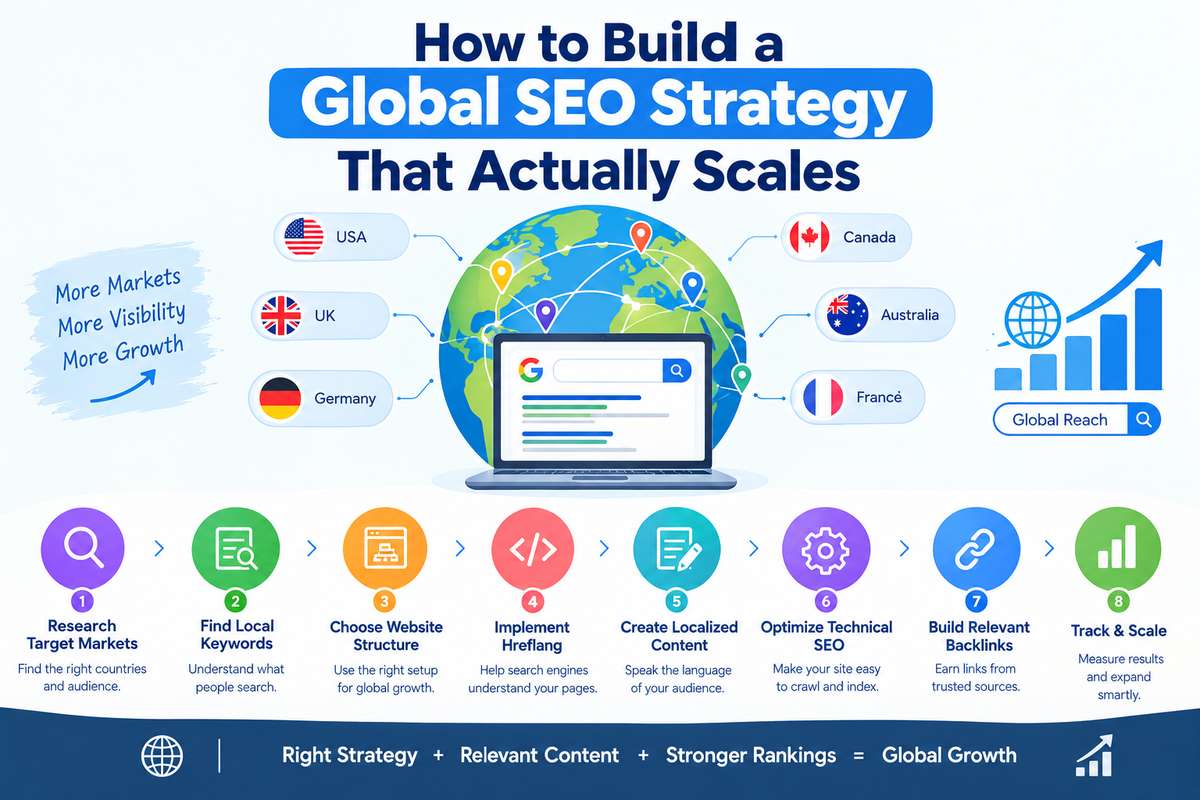
How to Build a Global SEO Strategy That Actually Scales

Expanding your business into international markets can help you reach new customers and grow your online presence. However, ranking in one country does not guarantee success in another. People use different languages, search for different solutions, and follow different buying habits.

A global SEO strategy helps businesses improve their visibility across multiple countries. It focuses on creating relevant content, targeting the right audiences, and making sure search engines can understand which pages serve each market.

In this guide, we will explain how to build a global SEO strategy that supports long-term growth without making your SEO work unnecessarily complicated.

What Is a Global SEO Strategy?

A global SEO strategy is a plan to improve a website’s visibility in search engines across multiple countries or language markets.

For example, a company selling software in the USA may want to attract customers in the UK, Canada, Australia, and Germany. Each market may require different keywords, landing pages, language choices, and content.

A strong global SEO strategy helps businesses:

  • Reach customers in different countries.
  • Target local search terms and user needs.
  • Build visibility in international search results.
  • Create a consistent website structure.
  • Expand SEO activities as the business grows.

1. Research Your Target Markets

Before creating international pages, decide which countries offer the best opportunities for your business.

Expanding into every country at once can waste time and resources. Start with markets that match your services, products, audience, and business goals.

What Should You Research?

  • Search demand: Check whether people in your target country search for your products or services.
  • Competition: Review websites already ranking for your target keywords.
  • Language: Identify whether users search in English or another language.
  • Business potential: Consider demand, customer needs, and your ability to serve each market.
  • Search intent: Understand whether users want information, comparisons, or a service provider.

Tools such as Google Search Console, Google Trends, Semrush, and Ahrefs can help you explore international search opportunities.

2. Conduct Country-Specific Keyword Research

One keyword may perform differently across countries. People in different markets may use different terms to find the same service.

For example, a user in the USA may search for “SEO services,” while a user in the UK may use a slightly different phrase depending on their needs.

Do not simply translate your existing keyword list. Research how people actually search in each market.

How to Find International Keywords

  • Research keywords separately for each target country.
  • Review local search results and competing pages.
  • Identify relevant long-tail keywords.
  • Group keywords by search intent.
  • Map each keyword group to the most suitable page.

Country-specific keyword research helps you create content that matches local demand instead of relying on assumptions.

3. Choose the Right Website Structure

Your website structure affects how search engines and visitors understand your international content.

Common options include:

StructureExampleBest use
Country-code domainexample.co.ukSeparate country-focused websites
Subdomainuk.example.comSeparate regional sections
Subdirectoryexample.com/uk/Managing markets under one main domain

Each option has advantages and limitations. Subdirectories can be easier to manage from one website, while country-specific domains can provide a clear local identity.

Choose a structure based on your resources, business needs, branding, and long-term expansion plans. Changing the structure later may require redirects and careful SEO migration work.

4. Use Hreflang Correctly

Hreflang annotations help search engines understand which language or regional version of a page is intended for particular users.

For example, a website may have separate English pages for the USA and UK. Hreflang can help search engines understand that these pages target different regional audiences.

To implement hreflang properly:

  • Use the correct language and regional codes.
  • Add the appropriate annotations to relevant page versions.
  • Make sure each version references the other applicable versions.
  • Use valid, accessible URLs.
  • Check implementation errors during technical SEO audits.

Hreflang is a signal, not a guarantee that Google will display a particular page to every user.

5. Create Content for Local Audiences

A global SEO strategy should not depend on copying the same content across every market.

Users in different countries may have different questions, preferences, regulations, and expectations. Your content should reflect those differences.

How to Localize Content

  • Use the language and terminology familiar to the audience.
  • Include locally relevant examples.
  • Adapt prices, currencies, measurements, and contact details where appropriate.
  • Address market-specific customer concerns.
  • Review translated content for accuracy and natural wording.

Translation changes the language. Localization adapts the content to the audience.

Useful localized content gives visitors a reason to trust your business and helps your pages better match their search intent.

6. Optimize Technical SEO for International Growth

Technical SEO helps search engines crawl, understand, and index your website.

As your website expands into more countries, technical problems can become harder to identify. A clear technical process helps you manage growth without creating unnecessary errors.

Focus on these areas:

  • XML sitemaps: Include the appropriate indexable URLs.
  • Robots.txt: Make sure important pages are not blocked accidentally.
  • Canonical tags: Identify the preferred URL for duplicate or similar pages.
  • Page speed: Improve loading performance across target markets.
  • Mobile usability: Ensure pages work well on mobile devices.
  • Indexing: Check whether important international pages appear in Google’s index.
  • Internal links: Connect relevant pages within your international website structure.

Run regular technical SEO audits to find problems before they affect a large number of pages.

7. Build Relevant Backlinks in Target Markets

Backlinks can help search engines discover content and contribute to search visibility. For international SEO, links from relevant websites in your target markets may also help local audiences discover your business.

Focus on earning useful links through:

  • Industry publications.
  • Relevant business directories.
  • Digital PR campaigns.
  • Expert contributions.
  • Original research and helpful resources.
  • Relationships with reputable websites in your industry.

Avoid building links simply to increase backlink numbers. Relevance, quality, and natural link acquisition are more important than collecting large numbers of low-quality links.

8. Track Performance Separately for Each Market

A global SEO strategy needs clear reporting. Overall website traffic may hide problems in individual countries.

Use Google Search Console to review search clicks, impressions, queries, and page performance. Use Google Analytics 4 to examine users, sessions, engagement, and configured conversions.

Track performance by country and relevant landing page.

Review these questions regularly:

  • Which countries generate the most organic visits?
  • Which pages attract relevant search traffic?
  • Are important keywords gaining visibility?
  • Are international visitors completing desired actions?
  • Which markets need content or technical improvements?

Use consistent date ranges when comparing results. Focus on meaningful business outcomes instead of rankings alone.

9. Build a Scalable SEO Workflow

Scaling global SEO does not mean creating hundreds of pages at once. It means building a repeatable process that maintains quality as your website grows.

Create a workflow for keyword research, content planning, localization, technical checks, publishing, and reporting.

Use templates where they save time, but avoid publishing near-identical pages with little value for different countries. Each page should serve a clear audience and provide useful information.

Start with a small number of priority markets. Measure results, improve your process, and expand when your team can maintain quality.

Common Global SEO Mistakes to Avoid

  • Translating keywords without researching local search behavior.
  • Publishing duplicate content across multiple country pages.
  • Implementing hreflang incorrectly.
  • Choosing a website structure without considering future growth.
  • Ignoring local competitors and customer needs.
  • Building low-quality backlinks to increase link counts.
  • Measuring global performance without reviewing individual markets.

Avoiding these mistakes can make international SEO easier to manage and more sustainable.

Conclusion

Building a global SEO strategy requires market research, country-specific keyword targeting, localized content, technical SEO, relevant backlinks, and consistent performance tracking.

Start with the markets that offer the strongest opportunities. Build a clear website structure, create content for local audiences, and monitor results before expanding further.

At SEO Outsourcing Company USA, we help businesses improve online visibility through keyword research, technical SEO, content optimization, and link building. Our approach focuses on building a strong SEO foundation that supports sustainable growth.

backlinks-vs-referring-domains.

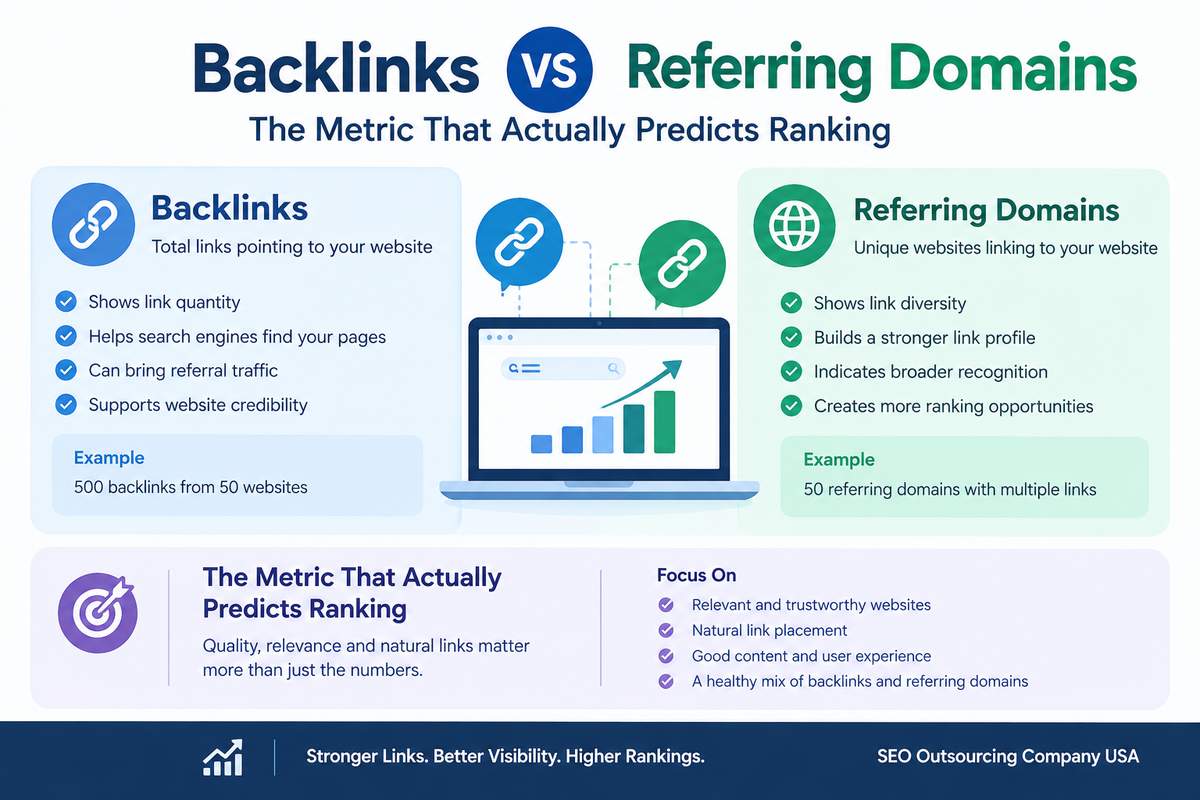
Backlinks vs. Referring Domains: The Metric That Actually Predicts Ranking

Backlinks and referring domains are two important SEO metrics. Both help you understand your website’s link profile, but they measure different things.

Backlinks count the links pointing to your website. Referring domains count the unique websites linking to it.

Getting more backlinks may seem like the best way to improve SEO. However, links from relevant, trustworthy websites can be more valuable than multiple links from the same source.

Let’s understand the difference between backlinks and referring domains, which metric matters more, and how to use both for better SEO results.

What Are Backlinks?

A backlink is a link from another website that points to your website.

For example, a marketing blog publishes an article about SEO tools and includes a link to your website. That link is a backlink.

Why Are Backlinks Important?

Backlinks can help you:

  • Support search visibility: Relevant backlinks can contribute to SEO performance.
  • Attract visitors: People can click links to visit your website.
  • Help search engines discover pages: Links can help search engines find content.
  • Build credibility: Links from trusted websites can help people discover your business.

Not every backlink has the same value. A relevant editorial link may be more useful than a link from an unrelated or low-quality page.

What Are Referring Domains?

A referring domain is a unique website that links to your website.

For example, if three different websites link to your website, you have three referring domains. If one website links to you ten times, your backlink count increases, but your referring domain count remains one for that website.

Why Are Referring Domains Important?

Referring domains help you understand how many different websites link to your content.

They help you:

  • Measure the diversity of your backlink profile.
  • Compare your link profile with competitors.
  • Identify websites that mention your business.
  • Discover guest posting, outreach, and digital PR opportunities.

A higher number of relevant referring domains can indicate broader recognition across websites. However, quality matters more than quantity alone.

Backlinks vs. Referring Domains: Key Differences

FeatureBacklinksReferring Domains
MeaningTotal links pointing to your websiteUnique websites linking to your website
MeasuresLink quantityDiversity of linking websites
Example500 links100 unique websites
Main benefitShows the total number of incoming linksShows how widely your website earns links
Common toolsAhrefs, SemrushAhrefs, Semrush
LimitationMany links may come from one domainMore domains do not guarantee better quality

In simple words: Backlinks show how many links you receive. Referring domains show how many different websites provide those links.

Example: Why Referring Domains Can Matter More

Imagine two websites have these backlink profiles.

Website A

  • 500 backlinks
  • 15 referring domains

Website B

  • 250 backlinks
  • 100 referring domains

Website A has more backlinks, but many links come from the same websites. Website B has links from a wider range of domains.

Website B may have a more diverse link profile, especially if those domains are relevant and trustworthy.

However, Website B will not automatically rank higher. Google rankings depend on several factors, including content quality, search intent, competition, technical SEO, and link relevance.

This example shows why backlink count alone cannot tell you how strong a website’s SEO performance is.

Which Metric Actually Predicts Rankings?

Neither backlinks nor referring domains can reliably predict rankings on their own.

The quality and relevance of your links matter more than simply increasing the numbers.

Consider these factors when reviewing your backlink profile:

1. Quality of Linking Websites

Check whether the website publishes useful content and serves a genuine audience. Do not judge a website only by its authority score.

2. Website Relevance

Links from websites related to your industry can provide useful context. For example, a digital marketing blog linking to an SEO agency’s guide is relevant.

3. Natural Link Placement

Editorial links placed naturally within useful content can help readers discover related information. Avoid link-building schemes designed to manipulate rankings.

4. Link Attributes

Links may include attributes such as nofollow, sponsored, or ugc. These describe the relationship between the linking website and the destination. Not all links pass the same ranking signals.

5. Overall Website Quality

Backlinks cannot solve every SEO problem. Your website also needs useful content, proper indexing, accessible pages, and a good user experience.

How to Check Backlinks and Referring Domains

You can use Ahrefs or Semrush to review your website’s backlink profile.

Step 1: Enter Your Website URL

Open your SEO tool and enter your domain.

Step 2: Open the Backlink Report

Review total backlinks, referring domains, linking pages, and available link attributes.

Step 3: Check Link Quality

Look for relevant websites with useful content and genuine audiences.

Step 4: Compare Competitors

Review competitors ranking for your target keywords. Identify relevant websites linking to them but not to you.

Step 5: Find Opportunities

Use your findings to plan content promotion, outreach, guest contributions, and digital PR.

Remember that SEO tools use their own databases and estimates. Backlink counts may differ between tools.

Common Mistakes to Avoid

  • Chasing backlink numbers: More links do not automatically mean better rankings.
  • Ignoring referring domains: Thousands of backlinks may come from only a few websites.
  • Focusing only on authority scores: Third-party scores are useful for comparisons but are not direct Google ranking factors.
  • Building irrelevant links: Prioritize links that make sense for your industry and audience.
  • Ignoring link quality: Review your backlink profile regularly and investigate unusual patterns before taking action.

Best Practices for a Strong Backlink Profile

  • Publish useful content that other websites want to reference.
  • Build relationships with relevant websites.
  • Use ethical guest posting and digital PR.
  • Prioritize quality referring domains over unnecessary link volume.
  • Monitor new and lost backlinks.
  • Review competitor backlink profiles for genuine opportunities.
  • Avoid paid link schemes intended to manipulate search rankings.

The goal is not to collect the highest number of backlinks. It is to earn relevant links that support your website’s visibility and help users find useful information.

Conclusion

Backlinks measure the total number of incoming links, while referring domains measure the number of unique websites linking to you. Both metrics are useful, but neither guarantees higher rankings.

Focus on link quality, relevance, domain diversity, and natural link acquisition. Combine these efforts with content optimization and technical SEO for a stronger SEO strategy.

At SEO Outsourcing Company USA, we help businesses improve online visibility through link building, backlink analysis, keyword research, on-page SEO, and technical SEO.

Visit SEO Outsourcing Company USA to explore our SEO services and strengthen your website’s search visibility.

Organic Traffic Vs Organic keywors

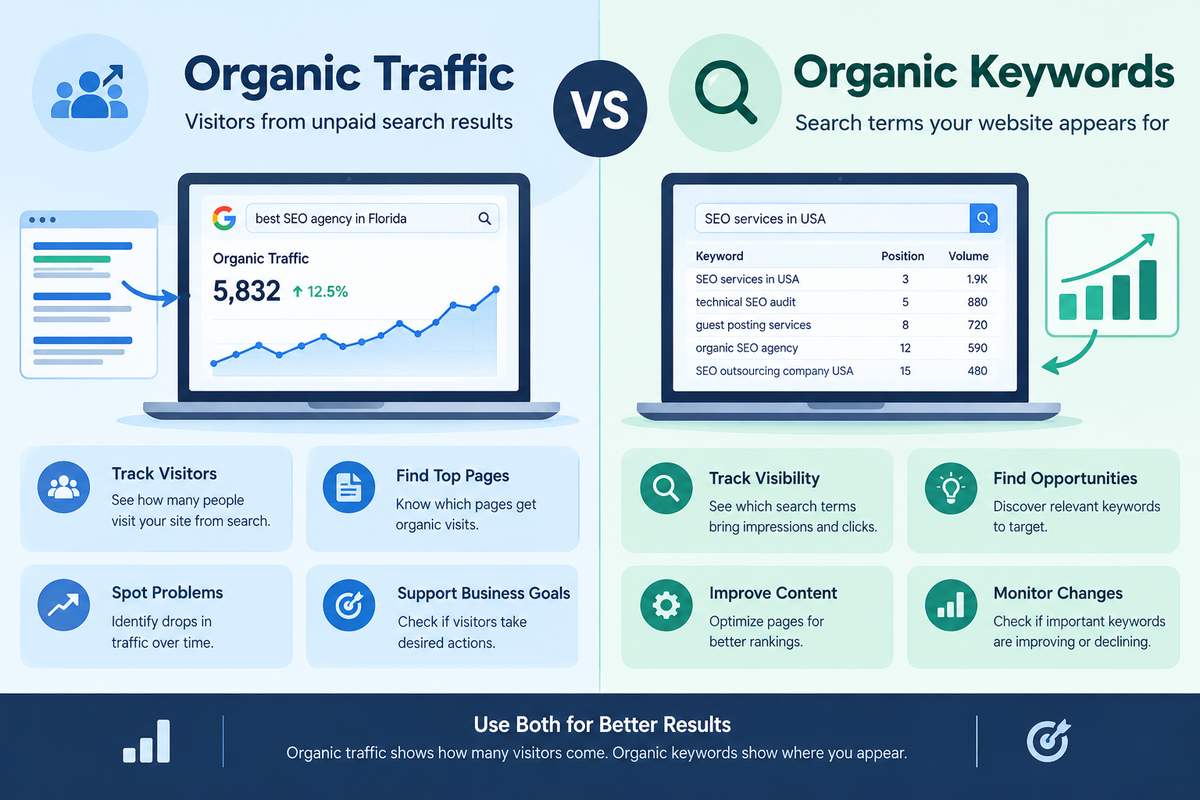
SEO Organic Keywords Vs Organic Traffic: What Should You Measure?

SEO organic keywords and organic traffic are two important SEO metrics. Both help you understand your website’s performance in search engines, but they measure different things.

Organic traffic shows how many visitors reach your website through unpaid search results. Organic keywords show which search terms your website appears for in search results.

Understanding both metrics helps you track SEO progress, find ranking opportunities, and improve your website’s visibility.

What Is Organic Traffic?

Organic traffic refers to visitors who reach your website through unpaid search engine results. For example, someone searches for “best SEO agency in Florida,” finds your website on Google, and clicks your page. This visit counts as organic traffic.

Why Is Organic Traffic Important?

Organic traffic helps you:

  • Measure SEO performance: Check whether your website attracts more visitors from search engines.
  • Identify popular pages: Find blog posts and service pages that receive organic visits.
  • Find traffic drops: Discover pages that are losing visitors.
  • Understand user activity: Check how visitors interact with your website.
  • Evaluate business results: See whether organic visitors complete useful actions, such as submitting enquiry forms.

You can use Google Analytics 4 (GA4) to measure organic search sessions, users, engagement, and configured conversions. Google Search Console also shows clicks from Google Search.

What Are Organic Keywords?

Organic keywords are the search terms for which your website appears in unpaid search results.

Examples include:

  • SEO services in the USA
  • Technical SEO audit
  • Guest posting services
  • Organic SEO agency
  • SEO outsourcing company USA

Organic keyword data helps you understand which search terms bring visibility to your website and where you can improve your rankings.

Why Are Organic Keywords Important?

Organic keywords help you:

  • Track search visibility: Find the terms for which your website appears.
  • Discover content ideas: Identify relevant topics for new blog posts.
  • Improve existing pages: Optimize content for relevant search terms.
  • Monitor rankings: Check whether important keywords are improving or declining.
  • Understand search intent: Learn what users want to find online.

Google Search Console shows actual queries that generate impressions and clicks. Tools such as Semrush and Ahrefs can help with keyword tracking and competitor research.

Remember, ranking for more keywords does not always mean receiving more traffic. Some keywords have low search demand or appear too far down the search results to attract clicks.

Organic Traffic vs Organic Keywords: Key Differences

FeatureOrganic TrafficOrganic Keywords
MeaningVisits from unpaid searchSearch terms your website appears for
Main purposeMeasure search visitsMeasure search visibility
Common toolsGA4, Google Search ConsoleGoogle Search Console, Semrush, Ahrefs
Increase indicatesMore organic visitsMore ranking terms or improved visibility
Main benefitUnderstand website visitsFind ranking opportunities
LimitationTraffic may not generate leadsRankings may not generate clicks

In simple words: SEO Organic keywords show where your website appears in search results. Organic traffic shows how many visitors arrive through unpaid search.

Example: Why You Need Both Metrics

Imagine your website ranks for 100 organic keywords and receives 500 organic visits in one month.

The following month, it ranks for 150 keywords but receives only 450 organic visits.

Your keyword count has increased, but your traffic has decreased.

Possible reasons include:

  • New keywords have low search volume.
  • Important keywords have lost ranking positions.
  • Pages receive impressions but few clicks.
  • Search demand has decreased due to seasonal changes.

The opposite can also happen. Your website may rank for fewer keywords but attract more visitors because its most important pages rank higher.

This is why measuring only one metric can give you an incomplete picture of SEO performance.

Which Metric Should You Measure?

1. To Increase Website Visitors

Focus on organic traffic. Compare visits across similar periods and identify which pages attract the most visitors. Investigate significant increases or decreases.

2. To Improve Search Rankings

Focus on organic keywords. Review ranking positions, impressions, clicks, and click-through rate (CTR). Improve page titles, headings, content, and internal links where needed.

3. To Find New Blog Topics

Focus on keyword research. Identify relevant search terms that match your audience’s needs. Review competitor keywords to discover useful topics your website has not covered.

4. To Generate More Leads

Measure organic traffic alongside conversions. A page with fewer visitors may generate more enquiries than a page with high traffic.

Use GA4 to track properly configured conversions, such as form submissions or completed enquiries. This helps you understand whether organic visitors contribute to your business goals.

How to Track Organic Traffic and SEO Organic Keywords

Step 1: Open Google Search Console

Select your website and open the Performance report. Review clicks, impressions, CTR, average position, search queries, and pages.

Step 2: Check GA4

Open the Traffic acquisition report and find the Organic Search channel. Review sessions, users, engagement, and configured conversions.

Step 3: Review Keyword Rankings

Use Google Search Console for search query data. Use Semrush or Ahrefs for broader keyword tracking and competitor analysis.

Step 4: Compare Results

Compare similar weekly or monthly periods. Check whether traffic is increasing, important keywords are improving, and visitors are completing useful actions.

Note that Google Search Console clicks and GA4 sessions will not always match because they measure different things.

Common Mistakes to Avoid

  • Focusing only on traffic: More visitors do not automatically mean more leads or sales.
  • Counting every keyword as a success: Prioritize relevant terms instead of chasing a higher keyword count.
  • Ignoring search intent: Your content should answer the question behind the search.
  • Comparing different periods: Use equivalent date ranges for more meaningful comparisons.
  • Ignoring conversions: Rankings and traffic are useful, but business results matter too.

Best Practices for Better SEO Results

  • Research relevant keywords before creating content.
  • Write useful content that answers user questions.
  • Optimize page titles, headings, and meta descriptions.
  • Improve internal linking between related pages.
  • Fix indexing issues and technical SEO problems.
  • Build relevant, quality backlinks naturally.
  • Update outdated content.
  • Review traffic, keyword visibility, and conversions regularly.

Conclusion

Organic traffic and organic keywords measure different parts of SEO performance. Organic keywords help you understand your search visibility, while organic traffic shows how many visitors arrive through unpaid search.

The best approach is to measure both metrics together. Track keywords to find ranking opportunities, monitor traffic to understand visitor activity, and review conversions to evaluate business results.

At SEO Outsourcing Company USA, we help businesses improve their search visibility through keyword research, on-page SEO, technical SEO, link building, and content optimization. Visit SEO Outsourcing Company USA to explore our SEO services and strengthen your website’s organic search presence.

local seo ranking factors

Local SEO for Small Businesses: A Step-by-Step Guide

For most small businesses, the next customer is just a quick search away. When someone nearby types “coffee shop near me” or “plumber in my area,” Google decides which handful of businesses to show first. Local SEO is how you make sure yours is one of them. The good news is that you do not need a big budget to compete locally. You just need to get the fundamentals right and stay consistent. This step-by-step guide walks you through exactly how to improve your local search visibility and turn nearby searchers into paying customers.

What Is Local SEO?

Local SEO is the process of optimizing your online presence so your business appears in local search results and on Google Maps. It focuses on location-based searches where buying intent is high and competition is often lower than for broad national keywords. For a small business, that makes it one of the highest-return marketing channels available.

Step 1: Claim and Optimize Your Google Business Profile

Your Google Business Profile, formerly Google My Business, is the single most important local ranking factor. Claim your listing, then complete every field: business name, address, phone number, website, hours, categories, services, and a keyword-rich description. Add real photos, choose the most accurate primary category, and keep your details current. A complete, active profile is far more likely to appear in the local map pack, the block of three businesses shown at the top of local results.

Step 2: Keep Your NAP Consistent Everywhere

NAP stands for Name, Address, and Phone number. Google cross-checks these details across the web to decide whether to trust your business. Make sure they are identical on your website, your Google Business Profile, social pages, and every directory. List your business on trusted local citations and fix any old or incorrect entries. Even small differences, such as “St.” versus “Street,” can confuse search engines and weaken your rankings.

Step 3: Target Local Keywords on Your Website

Add your service plus your location to your important pages, naturally. Use the phrases your customers actually search, like “emergency electrician in Austin” rather than just “electrician.” Place these in your page titles, headings, meta descriptions, and body content. If you serve several areas, create a dedicated, genuinely useful page for each location instead of copying the same text with the city name swapped out.

Step 4: Earn and Respond to Reviews

Reviews are one of the strongest local ranking and trust signals. Ask happy customers to leave a Google review and make it easy by sharing a direct review link. Reply to every review, positive or negative, in a calm and professional tone. A steady flow of genuine reviews, especially ones that mention your service and city, can push you ahead of competitors who ignore this step entirely.

Step 5: Create Helpful Local Content

Publish content that answers the questions your local customers ask. Blog posts, FAQs, and location guides help you rank for more long-tail searches and show Google that you are an active, relevant local business. Good content also gives you something valuable to share on social media and to attract links from other sites.

Step 6: Build Local Links and Citations

Links from local and industry-relevant websites boost your authority. Get listed in local business directories, partner with nearby businesses, sponsor a community event, or contribute a guest article to a relevant blog. A few quality, relevant links almost always outperform dozens of low-quality ones, so focus on relevance over volume.

Step 7: Track, Audit, and Improve

Local SEO is not set-and-forget. Monitor your rankings, calls, and direction requests, and review which pages bring in traffic. Run a quick technical and on-page check regularly with a free SEO audit tool to catch issues like missing titles, slow pages, or broken links before they cost you visibility. Then fix what is weak and double down on what is already working.

Common Local SEO Mistakes to Avoid

·         Inconsistent name, address, or phone number across the web

·         An incomplete or inactive Google Business Profile

·         Ignoring reviews or never replying to them

·         Thin, duplicate location pages created only for keywords

·         Chasing low-quality links instead of relevant ones

Conclusion

Local SEO rewards consistency far more than it rewards budget. Optimize your Google Business Profile, keep your business details consistent, target the right local keywords, collect reviews, and stay active with content and links. If you would rather have an expert handle it, professional local SEO services can speed things up. Do these steps well, give it time, and your small business can steadily climb the local results and win more nearby customers.

GSC vs GA4

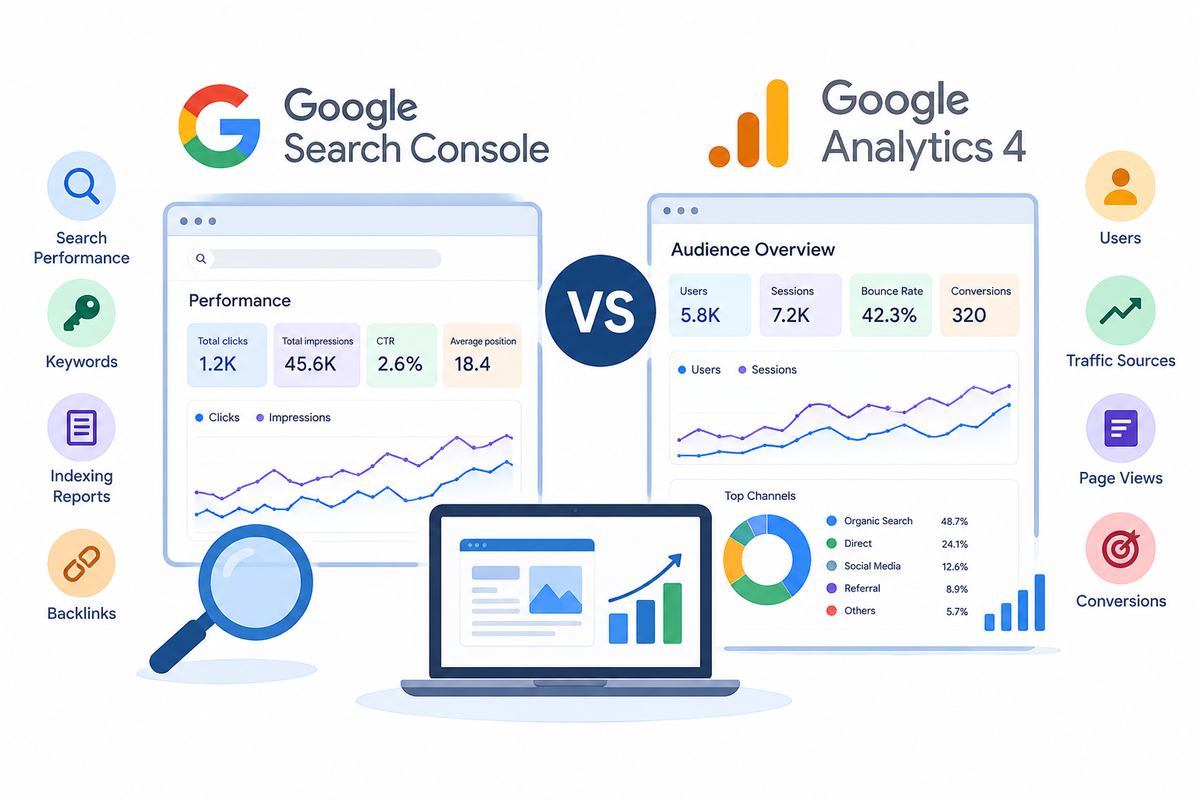
Google Search Console vs GA4: What Is the Difference?

Google Search Console and Google Analytics 4 (GA4) are two free tools that help website owners understand website performance. Both tools are useful for SEO, but they provide different information.

Google Search Console shows how your website performs in Google Search. GA4 shows how visitors interact with your website after they arrive.

Understanding the difference between these tools helps you identify SEO problems, improve website content, and understand visitor behavior. In this guide, we will explain their features, differences, and how to use them together.

What Is Google Search Console?

Google Search Console is a free tool that helps you monitor your website’s performance in Google Search. It provides information about search queries, clicks, impressions, indexing, and other search-related issues.

It is especially useful for understanding how people discover your website through search engines.

Main Features of Google Search Console

  • Search performance: Shows how your website appears in Google Search results.
  • Keywords: Displays search queries that bring impressions and clicks to your website.
  • Clicks and impressions: Shows how often people see and click your website in search results.
  • Indexing reports: Helps you understand whether Google has indexed your pages.
  • Sitemap submission: Allows you to submit an XML sitemap to help Google discover your URLs.
  • Technical reports: Provides information about certain indexing and page experience issues.
  • Backlink reports: Shows links from other websites that Google has discovered pointing to your website.

For example, if you publish a blog about SEO services in the USA, Search Console can show how often that blog appears in Google Search and how many people click it.

This information helps you understand whether your pages are reaching people searching for related topics.

What Is Google Analytics 4?

Google Analytics 4, also known as GA4, is a free tool that helps you understand how people use your website. It collects website activity through events, such as page views, button clicks, and form submissions, depending on your tracking setup.

Unlike Search Console, GA4 focuses on visitor activity rather than search result performance.

Main Features of GA4

  • Users: Shows the number of users who visit your website according to GA4’s reporting methods.
  • Traffic sources: Helps identify whether visitors arrive through organic search, social media, referrals, or other channels.
  • Page views: Shows which pages people view on your website.
  • Engagement: Helps you understand how visitors interact with your content.
  • Conversions: Tracks important actions, such as purchases or inquiry submissions, when configured correctly.
  • Device reports: Shows how people access your website through mobile phones, computers, and tablets.
  • Landing pages: Helps you identify the pages through which visitors enter your website.

For example, if someone visits your website through Google Search and reads a blog, GA4 can help you understand their activity on the website.

You can also measure whether visitors submit a contact form if suitable tracking is in place.

Google Search Console vs GA4: Key Differences

Both tools help you understand website performance, but they measure different activities.

FeatureGoogle Search ConsoleGA4
Main purposeMeasures Google Search performanceMeasures website activity
KeywordsShows search queries from Google SearchDoes not provide the same search query report
ImpressionsReports search result impressionsDoes not report Google Search impressions
ClicksReports clicks from Google Search resultsMeasures tracked website activity
VisitorsFocuses on search performanceReports website users and sessions
IndexingProvides indexing reportsNot designed for indexing checks
EngagementLimited website behavior dataProvides engagement reports
ConversionsNot designed for general conversion trackingMeasures configured conversions
BacklinksProvides a report of discovered linksDoes not provide a backlink report
CostFreeFree for the standard GA4 property

In simple words, Search Console helps you understand how people find your website through Google Search, while GA4 helps you understand what happens after they visit.

What Are Clicks, Impressions, and Sessions?

These terms are important when working with SEO reports.

  • Impressions: The number of times your website’s result appears in Google Search results.
  • Clicks: The number of times people click your website’s search result.
  • Sessions: Groups of interactions recorded during visits to your website in GA4.

For example, your website may receive 1,000 impressions and 100 clicks in Search Console. GA4 might report a different number of sessions from organic search.

This difference is normal because the tools measure different activities. Consent settings, tracking problems, reporting time differences, repeated visits, and page loading issues can also affect the numbers.

Therefore, clicks and sessions should not be expected to match exactly.

Which Tool Is Better for SEO?

Neither tool is better in every situation. The right choice depends on what you want to understand.

When Should You Use Google Search Console?

Use Search Console when you want to:

  • Find search queries that bring visitors to your website.
  • Check whether Google has indexed important pages.
  • Identify pages receiving impressions but few clicks.
  • Monitor clicks, impressions, CTR, and average position.
  • Review sitemap and indexing problems.
  • Understand which pages appear in Google Search.

For example, if a blog receives many impressions but very few clicks, review its title, search intent, ranking position, and description. These changes may help make the search result more relevant to users.

When Should You Use GA4?

Use GA4 when you want to:

  • Understand which channels bring website visitors.
  • Identify popular landing pages.
  • Measure engagement with your content.
  • Track inquiry forms and other business goals.
  • Compare organic search traffic with other channels.
  • Understand what visitors do after landing on your website.

For example, if a blog attracts visitors but few people contact your business, GA4 can help you investigate engagement and conversion activity. You may need to improve internal links, calls to action, or the page experience.

How to Use Google Search Console and GA4 Together

Using both tools provides a more complete view of website performance.

Step 1: Check search performance

Open Search Console and review clicks, impressions, CTR, average position, search queries, and pages.

Step 2: Identify pages that need improvement

Find pages with low CTR or declining search performance. Review their content, titles, and relevance to the search query before making changes.

Step 3: Review visitor behavior in GA4

Check organic search sessions, landing pages, engagement, and configured conversions. This helps you understand how visitors interact with the website.

Step 4: Make improvements

Update content, improve internal links, address indexing issues, or simplify the user journey based on your findings.

Step 5: Monitor the results

Compare suitable date ranges and allow enough time for SEO changes to take effect. Search Console helps you track search performance, while GA4 helps you measure website activity.

Common Mistakes to Avoid

  • Expecting identical numbers: Clicks and sessions are different measurements.
  • Ignoring indexing issues: Search engines must be able to access and index eligible pages for them to appear in search results.
  • Focusing only on traffic: More visitors do not automatically mean more customers.
  • Ignoring search intent: Your content should answer the questions users want to solve.
  • Making changes too quickly: SEO improvements can take time to show results.
  • Ignoring conversion tracking: Without proper setup, you may not know whether visitors complete important actions.

Conclusion

Google Search Console and GA4 are both valuable tools for improving website performance. Search Console helps you understand search visibility, keywords, clicks, impressions, and indexing. GA4 helps you understand website visitors, engagement, traffic sources, and conversions.

Using both tools together allows you to identify problems, improve content, and make informed SEO decisions.

If you want to improve your website’s search visibility, technical performance, and content quality, SEO Outsourcing Company USA can help. Our agency offers keyword research, on-page SEO, link building, technical SEO, and content optimization services to support your online growth. Visit SEO Outsourcing Company USA to explore our services and discover how a well-planned SEO strategy can support your business goals.

100 $ seo

What Is 100 $ SEO and What Does It Include?

Every business wants to improve its Google rankings, attract more website visitors, and generate leads without spending a huge amount on marketing. However, professional SEO services can sometimes be expensive, especially for startups, small businesses, freelancers, and local service providers. This is why 100 $ SEO is an attractive option for businesses looking for affordable search engine optimization.

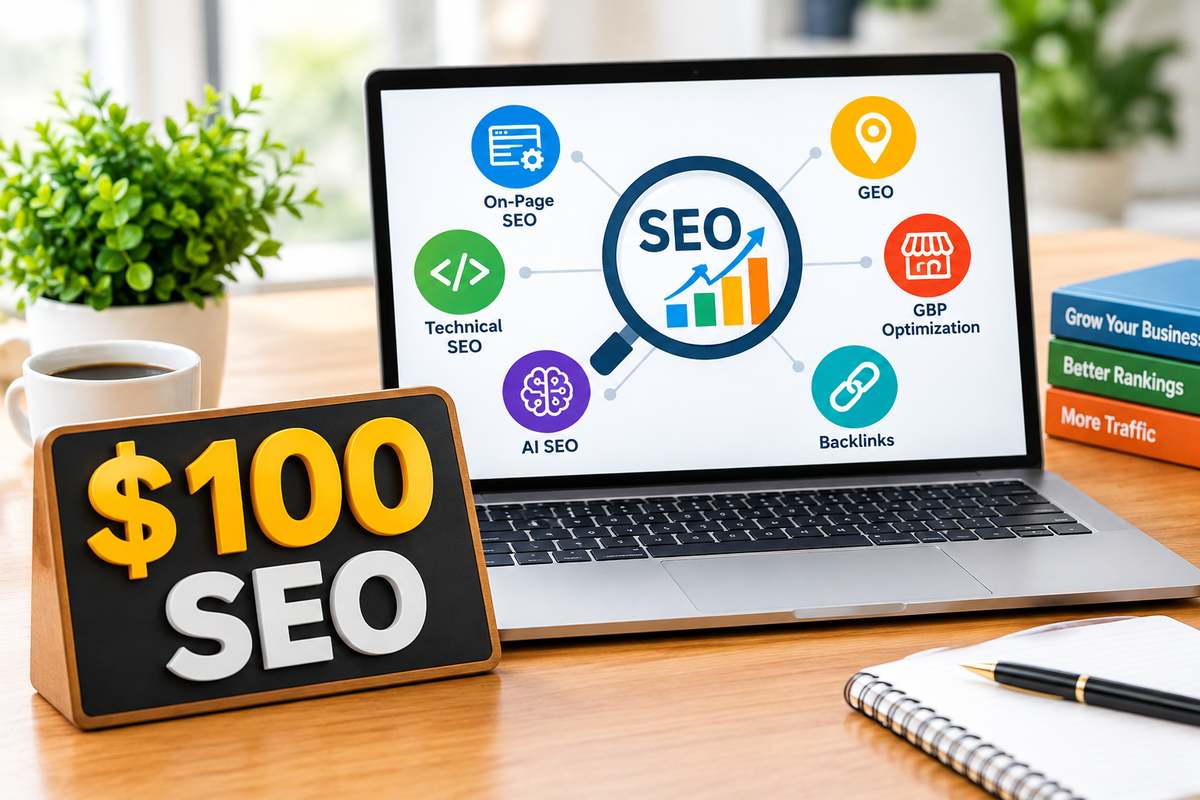
100 $ SEO provides businesses with an opportunity to work on important SEO activities within a limited budget. Depending on the package, these activities may include on-page SEO, technical SEO, AI SEO, Generative Engine Optimization (GEO), Google Business Profile (GBP) optimization, and backlinks.

However, before choosing a service, it is important to understand what 100 $ SEO means, what it includes, and whether it is suitable for your business. In this guide, we explain the main services that can be included in an affordable SEO package.

What Is 100 $ SEO?

100 $ SEO is an affordable search engine optimization service offered for $100 under an agreed package or service period. It is designed for businesses that want professional SEO assistance without committing to a large marketing budget.

Search engine optimization involves improving a website so search engines can understand its content and users can discover relevant pages through organic search results. This process may involve optimizing website content, addressing technical issues, researching keywords, improving local search visibility, and building a stronger online presence.

A 100 $ SEO package can help businesses focus on selected SEO activities that match their immediate requirements. For example, a small business might need improvements to its service pages, while a local company may want to optimize its Google Business Profile.

The services included depend on the SEO provider and the package’s scope. Some packages cover a specific set of tasks, while others offer limited monthly SEO support. Therefore, always confirm what the $100 price covers before starting.

What Does 100 $ SEO Include?

The services included in 100 $ SEO depend on the website, business requirements, and agreement with the SEO provider. A package may cover selected activities across several important areas of search engine optimization.

1. On-Page SEO

On-page SEO is an important part of improving website visibility. It focuses on optimizing individual pages so search engines and visitors can understand their purpose.

A 100 $ SEO package may include title tag optimization, meta description improvements, heading structure, keyword placement, internal linking recommendations, and content optimization for selected pages.

For example, a company offering web design services may have a page targeting affordable website design. Optimizing the page with relevant information, clear headings, suitable keywords, and useful content can help make it more relevant to potential customers.

The goal of on-page SEO is not to repeat keywords unnecessarily. Instead, it is to make each page informative, easy to understand, and relevant to the searcher’s needs.

2. Technical SEO

Technical SEO focuses on making a website accessible to search engines and helping important pages get crawled and indexed correctly.

Depending on the package, 100 $ SEO may include basic technical checks for XML sitemaps, robots.txt, indexing issues, broken links, canonical tags, redirects, and mobile usability.

For example, if an important service page is accidentally blocked from indexing, identifying the issue can help the business take corrective action.

Technical SEO requirements vary between websites. A small business website may need only a few basic improvements, while a large ecommerce website may require an extensive audit and development support.

A clear SEO package should explain which technical checks are included and whether implementing complex fixes costs extra.

3. AI SEO

AI SEO focuses on improving website content and information for a search environment increasingly influenced by artificial intelligence.

People now use traditional search engines and AI-powered tools to research products, compare services, and find answers. Businesses should ensure their website provides useful, accurate, and clearly organized information.

AI SEO activities may include improving content structure, answering relevant customer questions, organizing service information, strengthening topical relevance, and identifying opportunities for answer-focused content.

For example, instead of publishing a page that only repeats the phrase “affordable SEO services,” a business can explain what its services include, who can benefit from them, and how the process works.

These improvements can help users understand the business and may support visibility across different search experiences. However, no SEO provider can guarantee that an AI platform will mention or recommend a particular website.

4. Generative Engine Optimization (GEO)

Generative Engine Optimization, also known as GEO, focuses on improving content so it can be understood and potentially surfaced in generative AI search experiences.

GEO involves creating useful content, answering specific questions, providing relevant context, organizing information with descriptive headings, and making important facts easy to understand.

For example, a digital marketing company can publish informative pages explaining its SEO services, pricing factors, optimization process, and common customer concerns.

A 100 $ SEO package may include selected GEO recommendations or improvements to priority website pages. A comprehensive GEO campaign involving extensive content creation, research, and ongoing monitoring may require a larger investment.

GEO should focus on helping people find reliable information rather than making unsupported claims about guaranteed AI visibility.

5. Google Business Profile (GBP) Optimization

Google Business Profile optimization is valuable for businesses that serve customers in specific locations.

An accurate and complete profile helps potential customers find important business information through Google Search and Google Maps.

Depending on the agreed scope, 100 $ SEO may include reviewing the business category, checking contact information, improving the business description, reviewing services, and identifying opportunities to improve profile completeness.

For example, a local plumbing company should provide accurate business information, select an appropriate category, and clearly describe the services it offers.

Businesses should remember that GBP optimization does not guarantee top rankings in Google Maps. Local search visibility depends on factors such as relevance, distance, and prominence.

Before purchasing 100 $ SEO, confirm whether Google Business Profile optimization is included because some packages focus exclusively on website SEO.

6. Backlinks and Off-Page SEO

Backlinks are links from other websites pointing to your website. Relevant links from legitimate sources can help search engines discover pages and may contribute to evaluating a website’s authority.

A 100 $ SEO package may include limited backlink-related activities, such as reviewing an existing backlink profile, identifying relevant link opportunities, or working on selected link placements if explicitly included.

The exact number and type of backlinks should be confirmed with the provider. High-quality links require time and effort, so businesses should be cautious of services promising thousands of backlinks for a very low price.

Bulk links from irrelevant or low-quality websites do not automatically improve rankings and may create SEO risks when they are part of manipulative link schemes.

A responsible SEO strategy prioritizes relevance, quality, and transparency rather than simply increasing backlink numbers.

Who Needs 100 $ SEO?

100 $ SEO can be suitable for startups, small businesses, freelancers, local service providers, and website owners who want to begin improving their online presence with a limited budget.

A new business may need help optimizing its homepage and important service pages. A freelancer may want to improve the visibility of a professional website. A local business may prioritize Google Business Profile optimization, while an online store may focus on selected product pages.

Affordable SEO can also help businesses identify immediate priorities before investing in a more extensive campaign.

However, large websites and businesses operating in highly competitive industries may need more comprehensive technical SEO, content development, digital PR, and ongoing optimization.

The right package depends on your website’s current condition, competition, and business goals.

Is 100 $ SEO Worth It?

100 $ SEO can be worthwhile when the package provides useful work that matches your business requirements.

For example, improving important page titles, identifying indexing problems, optimizing business information, or refining existing content can help address specific SEO needs.

However, SEO results are not immediate. Rankings and organic traffic depend on competition, website quality, search engine changes, content relevance, and many other factors.

Avoid providers that guarantee first-page rankings within a few days or promise a specific amount of traffic simply because you purchase an affordable package.

Before starting, ask which pages will be optimized, whether AI SEO and GEO are included, how GBP optimization is handled, what backlink activities are provided, and whether reporting is available.

Understanding these details will help you judge the value of the service more accurately.

Why Choose SEO Outsourcing Company USA for 100 $ SEO?

SEO Outsourcing Company USA provides affordable SEO services for businesses that want to improve their online visibility without committing to expensive marketing packages.

We understand that businesses have different requirements. Some need on-page SEO and technical improvements, while others want assistance with AI SEO, GEO, Google Business Profile optimization, or backlink-related activities.

Our approach focuses on understanding your requirements and identifying suitable SEO priorities within the agreed budget. The exact services and deliverables should be confirmed before work begins so you know what your package covers.

Whether you operate a small business website, a local service company, or an online business, choosing an affordable SEO solution can be a practical first step toward improving your organic search presence.

Conclusion

100 $ SEO is an affordable option for businesses that want to start improving their website visibility without investing in an expensive SEO campaign. Depending on the agreed package, it may include on-page SEO, technical SEO, AI SEO, GEO, Google Business Profile optimization, and backlink-related work.

The key is to choose a provider that explains its services clearly, follows responsible SEO practices, and sets realistic expectations. A $100 package has limitations, but the right priorities can help businesses begin addressing important SEO needs.

If you need affordable 100 $ SEO, contact SEO Outsourcing Company USA, which provides 100 $ SEO services for businesses looking for budget-friendly search engine optimization. Get in touch with SEO Outsourcing Company USA to discuss your requirements and explore an affordable SEO solution for your business.

Types of Ai seo

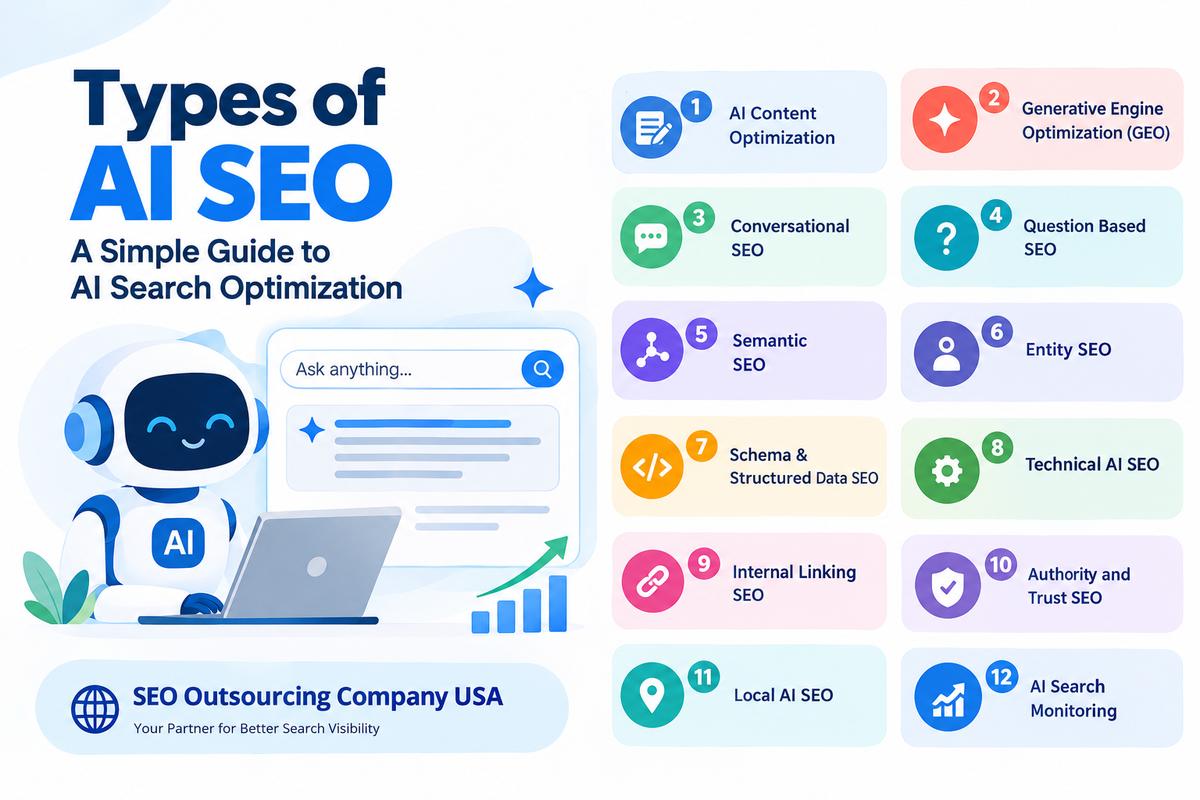
Types of AI SEO

AI is changing the way people search for information online. Today, users do not always type short keywords into Google. They also ask complete questions through AI tools and search systems.

This change has created a growing area of SEO called AI SEO. AI SEO focuses on making website content easy for search engines and AI systems to understand, find, and use when answering user questions.

AI SEO does not replace traditional SEO. It works with it. Websites still need good content, keywords, technical SEO, links, and a good user experience.

Here are the main types of AI SEO businesses should know about.

1. AI Content Optimization

AI content optimization means creating content that is useful, clear, and easy to understand.

Good content should:

  • Answer the user’s question directly
  • Use simple language
  • Have clear headings
  • Provide useful examples
  • Avoid unnecessary information
  • Give accurate and updated information

The main goal is to help the reader first while also making the content easier for AI systems to understand.

2. Generative Engine Optimization

Generative Engine Optimization, also called GEO, focuses on improving content for AI generated search results.

AI search tools may collect information from different websites before creating an answer. Businesses can improve their chances of being noticed by creating useful and trustworthy content.

Some important practices include:

  • Giving clear answers
  • Covering topics in detail
  • Using accurate information
  • Adding original information
  • Answering common questions
  • Keeping content updated

3. Conversational SEO

People often search by asking complete questions instead of using only two or three keywords.

For example, instead of searching for “local SEO services,” someone may ask:

“How can local SEO help my small business?”

Conversational SEO focuses on these natural questions.

Businesses can use:

  • Question based headings
  • Long tail keywords
  • FAQs
  • Natural language
  • Direct answers

This helps content match the way people naturally search and communicate with AI tools.

4. Question Based SEO

Question based SEO focuses on answering the questions customers have about a business, service, or product.

For example, an SEO website can answer:

  • What is SEO?
  • How does keyword research work?
  • What is technical SEO?
  • How long does SEO take?
  • What is AI SEO?
  • Why is link building important?

Answering these questions clearly can make a website more useful to users and search systems.

5. Semantic SEO

Semantic SEO focuses on the meaning of a topic rather than using the same keyword repeatedly.

For example, a page about SEO for doctors can naturally discuss:

  • Medical websites
  • Patient searches
  • Local SEO
  • Healthcare content
  • Online reviews
  • Google Business Profile
  • Website trust

These related topics help search systems understand the subject of the page.

6. Entity SEO

Entity SEO helps search engines understand important subjects such as businesses, people, products, places, and organizations.

For a business, important information can include:

  • Business name
  • Location
  • Services
  • Industry
  • Website
  • Contact information

Keeping this information clear and consistent can help search systems understand the business better.

7. Schema and Structured Data SEO

Schema markup provides search engines with additional information about a webpage.

Depending on the website, businesses may use different types of schema, such as:

  • Organization
  • Local Business
  • Article
  • Product
  • Service
  • FAQ
  • Review

Schema does not guarantee that a website will appear in an AI answer, but it can help search systems understand page information more clearly.

8. Technical AI SEO

Technical SEO is still important for AI search.

If search engines cannot properly crawl or access a website, its content may have difficulty being found and understood.

Technical SEO can include:

  • Checking crawling problems
  • Fixing indexing issues
  • Improving website speed
  • Fixing broken links
  • Checking mobile performance
  • Managing redirects
  • Using canonical tags
  • Checking XML sitemaps
  • Reviewing robots.txt
  • Checking structured data

A technically healthy website provides a better foundation for search visibility.

9. Internal Linking SEO

Internal links connect different pages on your website.

For example, an SEO services page can link to pages about:

  • Technical SEO
  • Local SEO
  • Content SEO
  • Link building
  • AI SEO
  • Keyword research

Good internal linking helps users find related information and helps search systems understand how different pages are connected.

10. Authority and Trust SEO

Trust is important when people and AI systems look for information.

Businesses can build a stronger online presence through:

  • Helpful content
  • Accurate information
  • Relevant backlinks
  • Trusted website mentions
  • Consistent business information
  • Expert content
  • Regular content updates

The focus should be on providing information that users can understand and trust.

11. Local AI SEO

Local AI SEO focuses on businesses that serve specific locations.

For example, someone may ask:

“Which SEO agency can help my business in Florida?”

Businesses should make sure their local information is accurate across their website and other online platforms.

This can include:

  • Business name
  • Address
  • Phone number
  • Service areas
  • Local pages
  • Business listings
  • Customer reviews
  • Location based content

12. AI Search Monitoring

AI SEO is not a one time activity. Search systems and user behavior continue to change.

Businesses should regularly monitor:

  • Search rankings
  • AI search results
  • Brand mentions
  • Website traffic
  • Important search queries
  • Competitor content
  • Old content that needs updating

Regular monitoring helps businesses find new opportunities and improve their content.

How to Build an AI SEO Strategy

A simple AI SEO strategy starts with understanding your customers.

First, find the questions they ask. Then create useful content that provides clear answers.

Businesses can also:

  • Research keywords and topics
  • Study competitors
  • Create helpful blogs and pages
  • Improve technical SEO
  • Add relevant internal links
  • Use suitable schema
  • Build relevant backlinks
  • Update old content
  • Keep business information consistent
  • Monitor SEO and AI search visibility

The main goal should always be the user. AI SEO is not about adding keywords again and again. It is about creating useful, clear, accurate, and easy to understand information.

Conclusion

AI SEO is becoming an important part of modern search marketing. It includes content optimization, GEO, conversational SEO, semantic SEO, entity SEO, technical SEO, schema, internal linking, authority building, local AI SEO, and AI search monitoring.

Businesses should focus on both traditional SEO and AI search optimization to build a stronger online presence.

If you need help improving your website for traditional search and AI search, SEO Outsourcing Company USA can help. Our agency provides services such as keyword research, content optimization, technical SEO, link building, on page SEO, off page SEO, local SEO, and AI SEO support.

With a clear strategy focused on useful content and better search visibility, SEO Outsourcing Company USA can help your business build a stronger presence in the changing world of search.