how to send 1000 urls for indexing

How to Send 1000 URLs for Indexing Using Google Indexing API

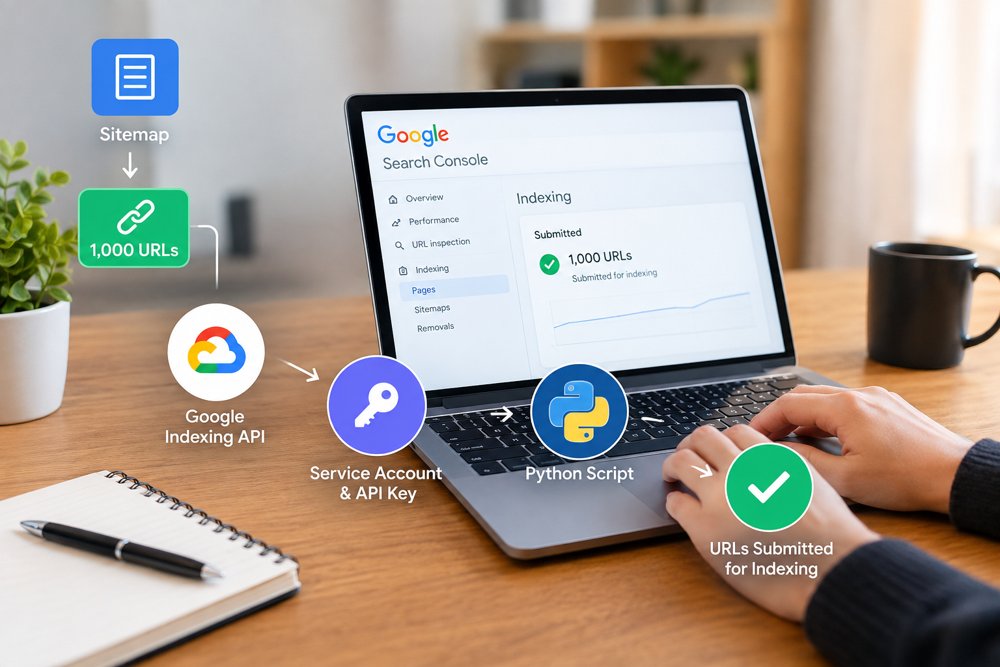
When a website has hundreds or thousands of URLs, submitting every URL manually for indexing can take a lot of time. If you have around 1,000 URLs that need to be submitted, you can use the Google Indexing API with Python to automate the process.

In this guide, we will explain how you can collect URLs from your sitemap, connect your Google account with the API, create service account keys, and send URLs for indexing.

What Is Google Indexing API?

Google Indexing API is a Google service that allows websites to notify Google when certain pages are added or updated. Instead of manually requesting indexing for individual URLs in Google Search Console, you can use an API-based process.

Before starting, make sure your website is added and verified in Google Search Console.

Step 1: Open Google Developer Console

First, open Google Developer Console and create or select a project for your website.

Inside the project, search for the Web Search Indexing API and enable it.

You will also need to create a service account. A service account provides an email address that can be given access to your Google Search Console property.

Step 2: Create Service Accounts and Keys

After enabling the API, go to the service account section and create a service account.

You can then create a key for the service account and download the JSON key file.

For a large URL submission project, you may need multiple service accounts and keys depending on the setup and API limits you are working with. Keep the downloaded JSON files secure because they contain credentials used by your script.

For example, if your setup requires five separate service accounts, create five service accounts and generate a key for each one.

Important: Do not publicly share your JSON key files or upload them to your website.

Step 3: Give the Service Account Access to Google Search Console

Now copy the email address of your service account.

Open Google Search Console and select your website property.

Go to the users and permissions section and add the service account email with the required owner-level access for the API workflow.

This step is important because creating an API key alone does not automatically give the service account permission to work with your Search Console property.

Step 4: Install Python

The next step is to install Python on the computer or hosting environment where you will run the indexing script.

Use a current supported Python 3 version. If your hosting control panel provides Python 3.10, you can create a Python 3.10 environment.

After installing Python, open your Control Panel or terminal provided by your hosting company.

Check that Python is working with:

python --version

or:

python3 --version

Step 5: Install the Required Python Packages

Once Python is installed, install the Google API packages required by the script.

For example:

pip install google-api-python-client google-auth google-auth-httplib2 google-auth-oauthlib

Depending on your hosting environment, you may need to use:

pip3 install google-api-python-client google-auth google-auth-httplib2 google-auth-oauthlib

The exact command can vary between hosting control panels.

Step 6: Fetch URLs From Your Sitemap

Instead of manually creating a list of 1,000 URLs, you can fetch the URLs directly from your website sitemap.

For example, your sitemap may contain URLs such as:

https://example.com/page-1/
https://example.com/page-2/
https://example.com/page-3/

A Python script can read the sitemap and collect the URLs automatically.

This is useful when you regularly publish new pages because you do not have to create a new URL list every time.

Step 7: Connect the Python Script With Your Google API

Place the service account JSON key file in a secure location on your server.

The Python script can then use the credentials from that file to authenticate with Google.

The basic workflow is:

Sitemap → Fetch URLs → Authenticate With Google → Send URLs to the API → Record the response

You can also make the script process URLs in batches rather than trying to send all 1,000 URLs at exactly the same time.

Step 8: Send the URLs for Indexing

After the API connection is configured, the script can go through your sitemap URLs one by one and send the appropriate indexing notification.

The script should also record successful requests and errors.

For example:

URL 1 – Submitted
URL 2 – Submitted
URL 3 – Error
URL 4 – Submitted

This makes it easier to identify URLs that need to be checked or processed again.

Can You Send 1000 URLs at Once?

You should not assume that the Google Indexing API allows unlimited requests simply because you have 1,000 URLs.

Google applies API quotas and eligibility requirements, and the Indexing API is intended for specific types of content. Sending a request through the API also does not guarantee that Google will index the URL.

For normal webpages, submitting URLs through Search Console’s sitemap functionality is generally the standard approach. The Indexing API has specific supported use cases, so make sure your website and content meet Google’s current requirements before using it.

Check the URLs in Google Search Console

After submitting the URLs, you can use Google Search Console to monitor your website.

You can check:

Indexing → Pages

This helps you understand which pages Google has discovered and which pages have indexing issues.

Remember that sending a URL to Google’s API is a request or notification. It is not a guarantee that the page will appear in Google search results.

Keep Your API Keys Secure

Your service account JSON files should always be kept private.

Do not:

Upload them to your public website

Share them through public groups

Add them to a public GitHub repository

Place them inside publicly accessible folders

If a key is exposed, create a new credential and remove access to the exposed one.

Need Help Sending Large Numbers of URLs?

Setting up Google Developer Console, service accounts, Search Console permissions, Python, sitemap fetching, and API requests can be confusing if you have never worked with APIs before.

If you need help setting up an automated URL submission workflow or managing your SEO indexing process, you can contact SEO Outsourcing Company USA for professional SEO support.

The team can help with technical SEO, Google Search Console, indexing-related tasks, AI SEO, GEO, AEO, and other SEO services for businesses.

seo services for shopify

SEO Services for Shopify Stores

Launching a Shopify store is fun! But do not expect to sell anything just because you launched your store’s website. There are thousands of Shopify Stores competing against each other on the Internet! Customers find your products mainly through Search Engines – which is why you need SEO Services for your Shopify store.

Search Engine Optimization (SEO) will allow your store to be shown in the correct channel when customers are looking to purchase the products you sell. Once you have the proper SEO strategies to drive traffic to your Shopify store, you will improve your visibility on search engines, gain a consistent flow of customers visiting your store regularly and you will convert visitors to customers.

Understanding Why SEO Matters for Shopify Stores

One of the leading eCommerce platforms available today is Shopify and it is very widely used by business owners/companies due mostly to the uncomplicated and easy to use interface for building an online retail website/store. Many businesses rely heavily on paid ads, failing to realize in the long run how valuable organic search traffic can be.

The focus of search engine optimization (SEO) on your online store on the Shopify platform will ensure that search engines (such as Google) understand what items you are selling and how to rank within the search results pages of those relevant keywords for which you are looking to be associated.

When your website ranks high for relevant keywords, customers/consumers will have a natural way to find your products without you having to pay for every click through to your website, creating a source of traffic that is sustainable over a longer period of time and often brings additional qualified traffic from individuals who are already in search of the type of products you provide.


Key Areas of Shopify SEO Optimization

Shopify SEO involves several key areas to ensure you have an effective strategy. First and foremost, your product pages must be optimised for the right keywords, provide clear descriptions and feature engaging content so that search engines can index them accurately. Secondly, your collection pages should be set up in a way that they target a wider breadth of product related terms.

Technical SEO is also critical in driving up search rankings. The following are technical elements that are important for the effective operation of your Shopify store: site speed, mobile friendly design, correct URL structure and optimised images. If these technical elements are correct then search engines will be able to crawl and index your store with greater ease.

In addition to producing high quality SEO content for your Shopify store, content marketing through blogs, guides, etc. will also increase visibility and generate additional traffic via information searches.


Common SEO Challenges for Shopify Stores

Shopify store owners often face difficulties due to limitations imposed by the platform. As a result, they may experience issues with duplicate content as product pages may appear in multiple collections at once. In addition, automatic URLs can lead to unnecessary pages being indexed by search engines and indexed by them. 

In addition, with the majority of store owners using only the manufacturer’s description of their products as product pages, they will have issues with content being too thin on their product pages, which will make it difficult to compete for top rankings at the organic level. With the above challenges, creating content unique to each product page and improving on page optimization will help dothe site owner with their difficulties.

There is an increasingly competitive eCommerce landscape which means that a comprehensive SEO Strategy will be needed for a Shopify Store to succeed (at a minimum) in technical optimization along with high quality Content.

How Professional Shopify SEO Services Help Your Business

Professional SEO solutions are an excellent method to increase the revenue potential of your Shopify store as they can improve your website’s search engine ranking, resulting in more people visiting and buying from you. These professionals will do a complete audit of your site for technical problems and issues you aren’t aware of before creating an appropriate strategy to optimize your website for the key phrases used by your future customers. 

They will also optimize your website’s architecture, title tags/description tags and create a comprehensive site plan/strategy to build on over time to make your site more visible in the search engines. In addition, link building and quality content creation will help to enhance the perceived authority of your store, thus making it more competitive with larger companies.

By implementing a strong/continuous SEO strategy, you will not only build a large following over time (which should lead to significant traffic/visitors), but you will see a marked improvement in traffic/visitors, increased ranking in Google, and, ultimately, an increase in sales through the conversion process.

Conclusion

Long-term success of a Shopify store can be accomplished through the use of SEO, one of the best ways to create long-term growth in your business. SEO allows you to find customers who are actively looking for your products, rather than relying only on paid advertising.

Shopify stores can create an ongoing flow of organic traffic if they are done properly including targeting the right keywords, optimizing product pages, and having a strong technical presence. At SEO Outsourcing Company USA provides quality SEO services for Shopify stores.

FAQS

Why do Shopify stores need SEO services?

Shopify stores need SEO services to improve search engine rankings, attract targeted traffic, and increase sales by optimizing product pages, site structure, and technical SEO.

What does Shopify SEO include?

Shopify SEO includes keyword research, product page optimization, technical SEO, site speed improvements, link building, and content optimization to boost visibility on search engines.

How long does Shopify SEO take to show results?

Shopify SEO typically takes 3–6 months to show noticeable improvements in rankings and traffic, depending on competition, website condition, and the SEO strategy used.

seo services for ecommerce

Why SEO Is Important for Ecommerce

SEO Helps Ecommerce Websites Get Found Online

Ecommerce websites are much more complex than building them and putting the products on them. One of the biggest challenges for ecommerce store owners is getting customers to find them online. Search Engine Optimization (SEO) will put your site and products on the search engine’s fire list, list because your products will come up when a potential customer types the correct keyword into the search engine. If your product and category pages are set up with the correct keywords and correctly styled, the search engines can find your site and then push you toward potential customers that are searching for products. In doing so, you will increase your chances of getting visitors who want to buy from you. SEO services provide ongoing qualified organic traffic that can continue to help your ecommerce business grow.

SEO Builds Trust and Improves User Experience

Another important reason, SEO plays such an integral role in eCommerce is that it establishes credibility and creates confidence among prospects. Many online shoppers start out their purchasing journey utilizing a search engine based on the products they want to buy. Being listed on the first page of “organic” (the search engine’s natural listings) search results helps create a perception amongst users that the brand is trustworthy or credible. SEO will also enhance the user experience from a website perspective; a fast loading, mobile friendly, and structured & easily navigable product page make for an easier means of exploring your eCommerce store. As a result, when users have a seamless experience while browsing the site, they are more likely to spend more time on the website and complete their purchase.

SEO Generates Long Term Sales and Growth

Long-term sales-generation through eCommerce SEO is one of the most effective methods available to businesses. While paid advertising can yield quick ROI (Return on Investment), traffic will cease once a business stops spending its budget. However, through properly SEO’d product pages and indexed content, eCommerce stores can continue to receive online visitors for an extended period of time. In addition, by taking advantage of eCommerce-specific search terms/keywords (based upon the types of products sold), a business’ website will be able to target searchers that are “just” researching, comparing products and/or ready to purchase. Targeting your ideal customer with the use of ecommerce SEO will very likely yield higher conversion rates.

SEO Helps Ecommerce Stores Compete in a Crowded Market

Ecommerce marketplaces are highly competitive, there are countless online stores that sell similar merchandise; however businesses can use SEO to compete against the larger, more established companies. A properly developed e-commerce SEO plan that incorporates SEO related technical enhancements, optimized SEO content, internal linking and high-quality backlinks will greatly impact the visibility of the e-commerce site in the SERP’s. Through the implementation of proper SEO techniques and providing quality SEO content, small “boutique” e-commerce stores will also be able to compete with the larger stores for valuable target keywords. This can lead to the development of a large, qualifying organic presence for an e-commerce store by consistently attracting new ,potential customers to the site.

Conclusion

Search Engine Optimization (SEO) is a very important element in the success of any eCommerce business. With proper SEO practices eCommerce businesses will have an increase in visibility on the internet, more targeted visitors, and a much better experience from their websites creating long term repeat sales. In addition, eCommerce businesses that invest in SEO develop a solid online presence that continues to drive customers long after they stop using paid advertisement methods.

If you’re looking to grow your eCommerce store and move up the search engine results pages, hire an eCommerce SEO outsourcing company USA. We offer a full range of professional eCommerce SEO services such as website audits, on-page optimization, technical SEO and building high-quality links.

Our skilled team will develop methods that produce real organic traffic and long-term success for your business. Work with our professionals today to increase your eCommerce success!.

FAQS

Why is SEO important for ecommerce websites?

SEO plays an integral role for ecommerce websites as it enables product listings to appear in search engines during customer shopping’s and thus leads to increased organic traffic along with potential sales.

How long does ecommerce SEO take to show results?

On average, businesses will generally see significant improvements in their e–commerce search engine rankings and organic traffic from SEO efforts within three to six months. However, depending on the competitive landscape and the SEO strategies employed, some businesses may experience results sooner than this.

What are the main SEO factors for ecommerce websites?

The main SEO factors include optimized product pages, fast website speed, mobile friendly design, proper site structure, quality content, and strong backlinks.