
Google Search Console vs GA4: What Is the Difference?
Google Search Console and Google Analytics 4 (GA4) are two free tools that help website owners understand website performance. Both tools are useful for SEO, but they provide different information.
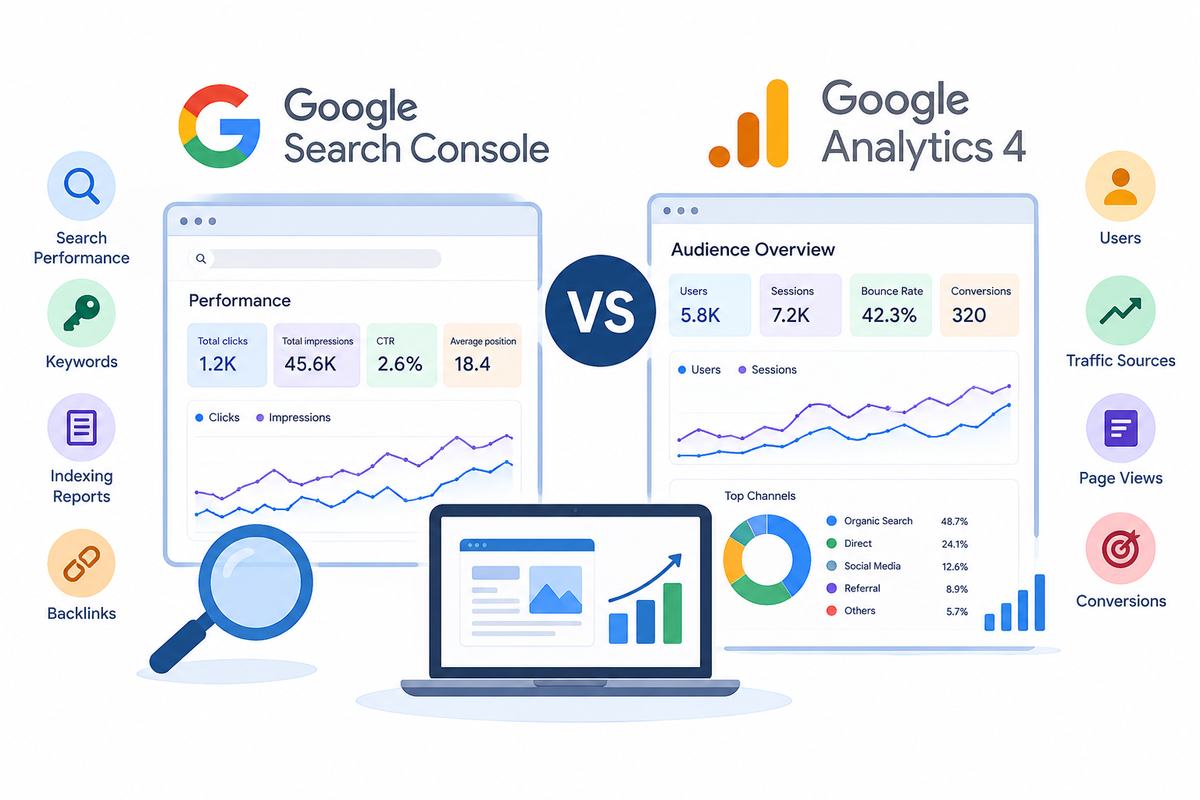
Google Search Console shows how your website performs in Google Search. GA4 shows how visitors interact with your website after they arrive.
Understanding the difference between these tools helps you identify SEO problems, improve website content, and understand visitor behavior. In this guide, we will explain their features, differences, and how to use them together.
What Is Google Search Console?
Google Search Console is a free tool that helps you monitor your website’s performance in Google Search. It provides information about search queries, clicks, impressions, indexing, and other search-related issues.
It is especially useful for understanding how people discover your website through search engines.
Main Features of Google Search Console
- Search performance: Shows how your website appears in Google Search results.
- Keywords: Displays search queries that bring impressions and clicks to your website.
- Clicks and impressions: Shows how often people see and click your website in search results.
- Indexing reports: Helps you understand whether Google has indexed your pages.
- Sitemap submission: Allows you to submit an XML sitemap to help Google discover your URLs.
- Technical reports: Provides information about certain indexing and page experience issues.
- Backlink reports: Shows links from other websites that Google has discovered pointing to your website.
For example, if you publish a blog about SEO services in the USA, Search Console can show how often that blog appears in Google Search and how many people click it.
This information helps you understand whether your pages are reaching people searching for related topics.
What Is Google Analytics 4?
Google Analytics 4, also known as GA4, is a free tool that helps you understand how people use your website. It collects website activity through events, such as page views, button clicks, and form submissions, depending on your tracking setup.
Unlike Search Console, GA4 focuses on visitor activity rather than search result performance.
Main Features of GA4
- Users: Shows the number of users who visit your website according to GA4’s reporting methods.
- Traffic sources: Helps identify whether visitors arrive through organic search, social media, referrals, or other channels.
- Page views: Shows which pages people view on your website.
- Engagement: Helps you understand how visitors interact with your content.
- Conversions: Tracks important actions, such as purchases or inquiry submissions, when configured correctly.
- Device reports: Shows how people access your website through mobile phones, computers, and tablets.
- Landing pages: Helps you identify the pages through which visitors enter your website.
For example, if someone visits your website through Google Search and reads a blog, GA4 can help you understand their activity on the website.
You can also measure whether visitors submit a contact form if suitable tracking is in place.
Google Search Console vs GA4: Key Differences
Both tools help you understand website performance, but they measure different activities.
| Feature | Google Search Console | GA4 |
|---|---|---|
| Main purpose | Measures Google Search performance | Measures website activity |
| Keywords | Shows search queries from Google Search | Does not provide the same search query report |
| Impressions | Reports search result impressions | Does not report Google Search impressions |
| Clicks | Reports clicks from Google Search results | Measures tracked website activity |
| Visitors | Focuses on search performance | Reports website users and sessions |
| Indexing | Provides indexing reports | Not designed for indexing checks |
| Engagement | Limited website behavior data | Provides engagement reports |
| Conversions | Not designed for general conversion tracking | Measures configured conversions |
| Backlinks | Provides a report of discovered links | Does not provide a backlink report |
| Cost | Free | Free for the standard GA4 property |
In simple words, Search Console helps you understand how people find your website through Google Search, while GA4 helps you understand what happens after they visit.
What Are Clicks, Impressions, and Sessions?
These terms are important when working with SEO reports.
- Impressions: The number of times your website’s result appears in Google Search results.
- Clicks: The number of times people click your website’s search result.
- Sessions: Groups of interactions recorded during visits to your website in GA4.
For example, your website may receive 1,000 impressions and 100 clicks in Search Console. GA4 might report a different number of sessions from organic search.
This difference is normal because the tools measure different activities. Consent settings, tracking problems, reporting time differences, repeated visits, and page loading issues can also affect the numbers.
Therefore, clicks and sessions should not be expected to match exactly.
Which Tool Is Better for SEO?
Neither tool is better in every situation. The right choice depends on what you want to understand.
When Should You Use Google Search Console?
Use Search Console when you want to:
- Find search queries that bring visitors to your website.
- Check whether Google has indexed important pages.
- Identify pages receiving impressions but few clicks.
- Monitor clicks, impressions, CTR, and average position.
- Review sitemap and indexing problems.
- Understand which pages appear in Google Search.
For example, if a blog receives many impressions but very few clicks, review its title, search intent, ranking position, and description. These changes may help make the search result more relevant to users.
When Should You Use GA4?
Use GA4 when you want to:
- Understand which channels bring website visitors.
- Identify popular landing pages.
- Measure engagement with your content.
- Track inquiry forms and other business goals.
- Compare organic search traffic with other channels.
- Understand what visitors do after landing on your website.
For example, if a blog attracts visitors but few people contact your business, GA4 can help you investigate engagement and conversion activity. You may need to improve internal links, calls to action, or the page experience.
How to Use Google Search Console and GA4 Together
Using both tools provides a more complete view of website performance.
Step 1: Check search performance
Open Search Console and review clicks, impressions, CTR, average position, search queries, and pages.
Step 2: Identify pages that need improvement
Find pages with low CTR or declining search performance. Review their content, titles, and relevance to the search query before making changes.
Step 3: Review visitor behavior in GA4
Check organic search sessions, landing pages, engagement, and configured conversions. This helps you understand how visitors interact with the website.
Step 4: Make improvements
Update content, improve internal links, address indexing issues, or simplify the user journey based on your findings.
Step 5: Monitor the results
Compare suitable date ranges and allow enough time for SEO changes to take effect. Search Console helps you track search performance, while GA4 helps you measure website activity.
Common Mistakes to Avoid
- Expecting identical numbers: Clicks and sessions are different measurements.
- Ignoring indexing issues: Search engines must be able to access and index eligible pages for them to appear in search results.
- Focusing only on traffic: More visitors do not automatically mean more customers.
- Ignoring search intent: Your content should answer the questions users want to solve.
- Making changes too quickly: SEO improvements can take time to show results.
- Ignoring conversion tracking: Without proper setup, you may not know whether visitors complete important actions.
Conclusion
Google Search Console and GA4 are both valuable tools for improving website performance. Search Console helps you understand search visibility, keywords, clicks, impressions, and indexing. GA4 helps you understand website visitors, engagement, traffic sources, and conversions.
Using both tools together allows you to identify problems, improve content, and make informed SEO decisions.
If you want to improve your website’s search visibility, technical performance, and content quality, SEO Outsourcing Company USA can help. Our agency offers keyword research, on-page SEO, link building, technical SEO, and content optimization services to support your online growth. Visit SEO Outsourcing Company USA to explore our services and discover how a well-planned SEO strategy can support your business goals.
